I handed Claude the ugliest sales spreadsheet I could make. The best part was what it refused to guess.
Mixed date formats, misspelled names, duplicates, missing amounts. One request cleaned it into a spreadsheet with a change log and a "needs review" list. I checked every number myself. Here's the exact prompt and what to watch for.
One request, every number re-checked by hand
Level: Beginner, no code needed. About 10 minutes. Works on any paid Claude plan, and I used a Pro account.
Everyone has a spreadsheet like this. An export from some tool, with dates in a handful of formats, the same salesperson spelled three ways, rows that appear twice, and a column of amounts where half the cells say N/A.
Cleaning it by hand is an hour of boring, error-prone work. Anthropic recently added Claude Sheets, Whiteboards and Data to paid plans, and I wanted to know if the spreadsheet part saves that hour. So I made the worst export I could think of and handed it over.
The mess I made
I built a 60-line sales export on purpose. It has:
- 8 different date formats (
2026-03-04,03/05/2026,March 7, 2026,12.03.2026,Mar 14 26...) - Regions written as
north,NORTH,W.andSth - Sales reps written two or three ways each (
Li Wei,li wei,T. Reyes,Tom Reyes) - Two exact duplicate rows and one completely blank row
- Amounts as
$2,374,USD 1406,625.00,N/A, or empty - Quantities that were sometimes a number, sometimes the word
two, sometimes missing
All the data is invented, so nothing here is anyone's real sales.
The request
On claude.ai, I started a new chat, attached the file, and wrote this:
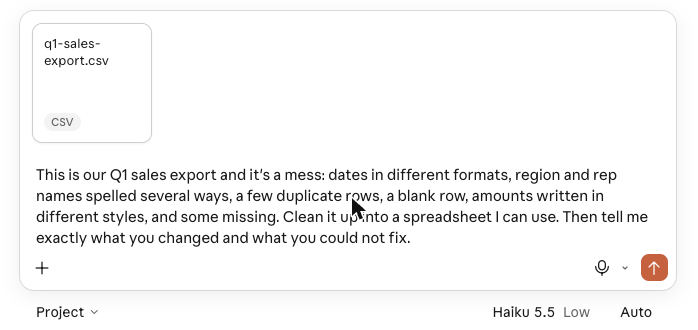
Here it is in full, so you can copy it:
This is our Q1 sales export and it's a mess: dates in different formats, region and rep names spelled several ways, a few duplicate rows, a blank row, amounts written in different styles, and some missing. Clean it up into a spreadsheet I can use. Then tell me exactly what you changed and what you could not fix.
One thing before you try it: I looked for a "New sheet" button in the sidebar and the plus menu and didn't find one. You don't need it. Attaching the file and asking for a spreadsheet was enough, and Claude produced an Excel file that opens in a panel next to the chat.
The last sentence is the important one. "Tell me exactly what you changed and what you could not fix" is what turns this from a black box into something you can trust.
What came back
It took about a minute. Claude gave me a workbook with three tabs, plus a plain-English summary of what it did.
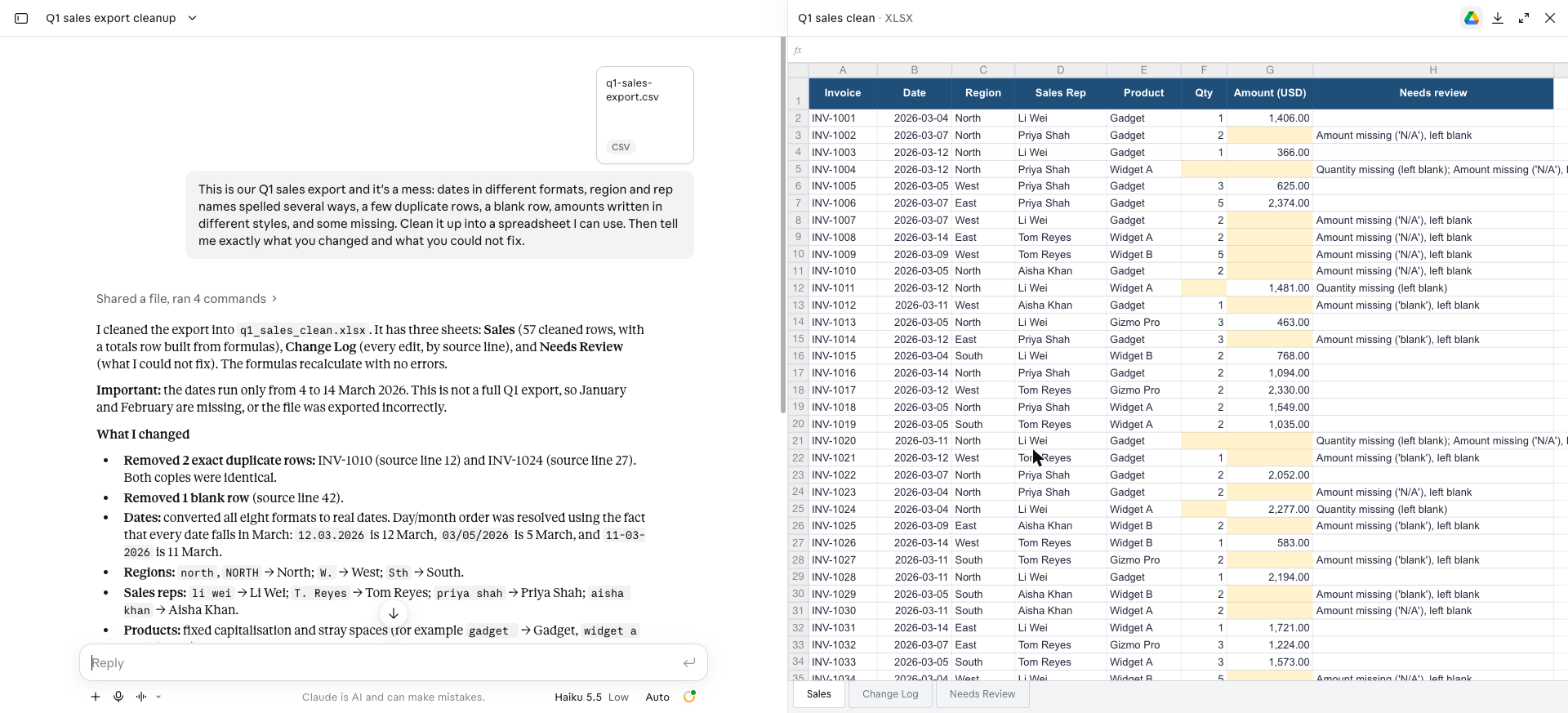
Sales is the clean data: 57 rows, dates as real dates, names fixed, amounts as numbers, and a totals row built with formulas. Rows with something missing are shaded so you can see them.
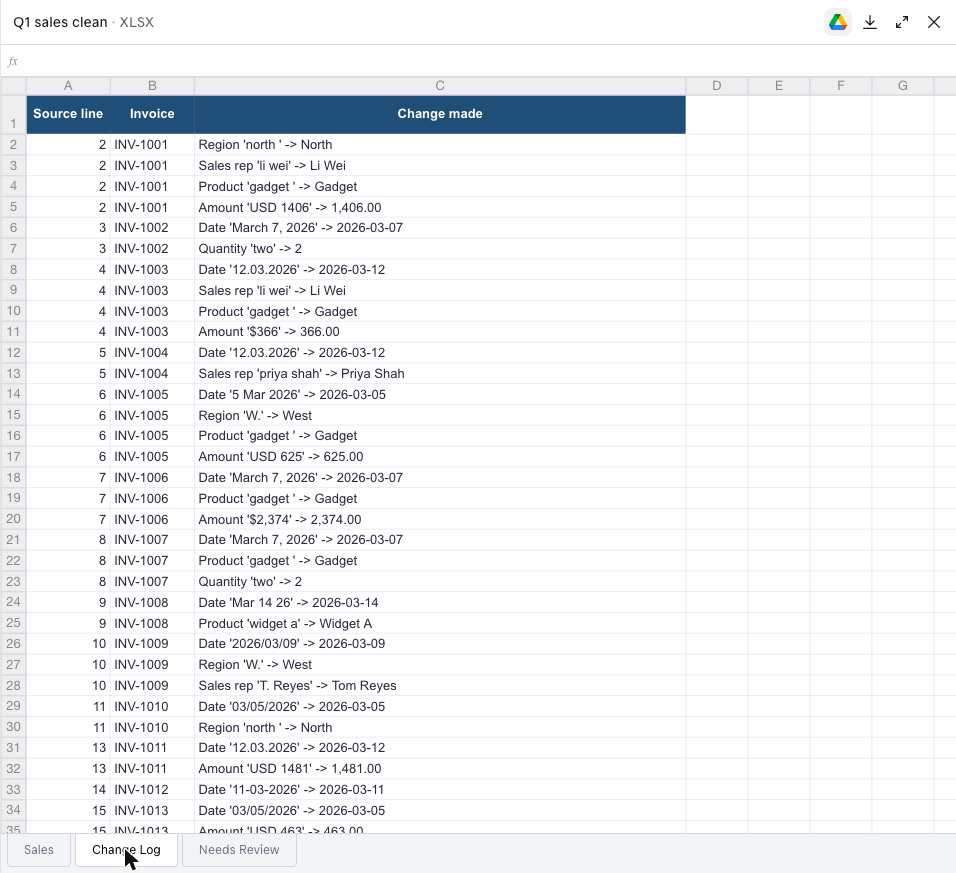
Change Log lists every single edit, by source line. Not "fixed some names." Actual entries like Region 'north ' -> North and Amount '$2,374' -> 2,374.00.
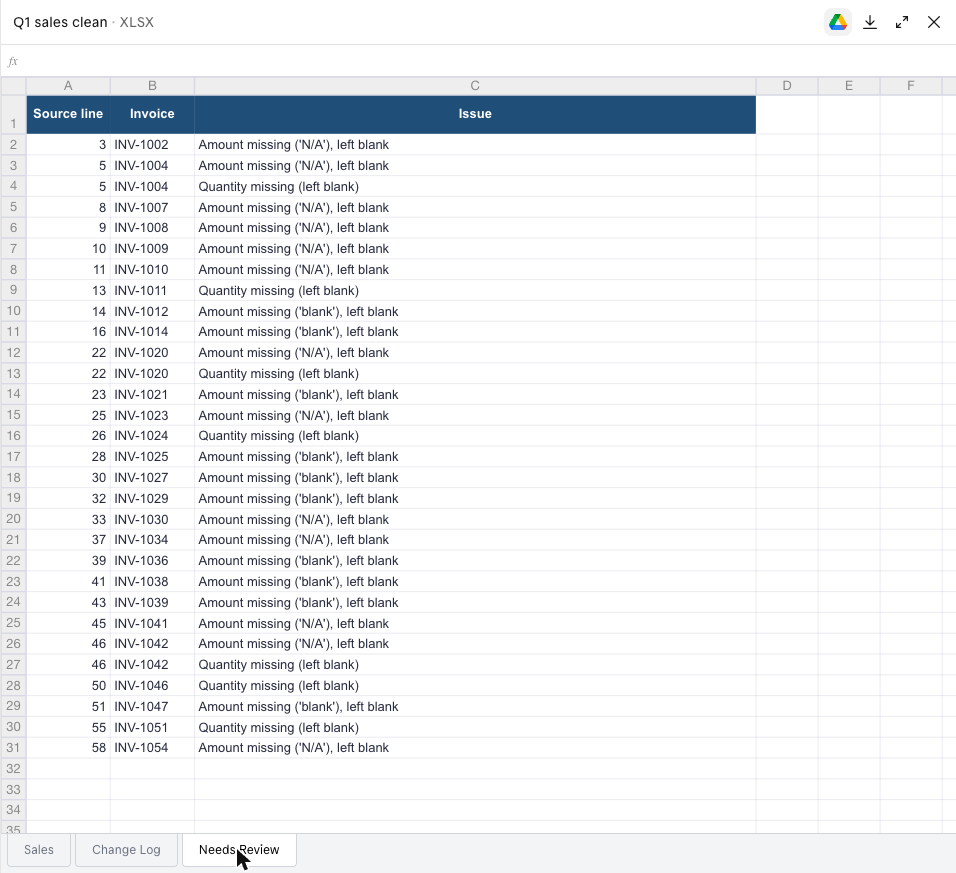
Needs Review is the list of things it would not fix:
It also noticed something I hadn't planned. My invented dates only run from 4 to 14 March, and Claude pointed out that this isn't a full quarter, so either January and February are missing or the export went wrong. That's the kind of thing you'd want to hear before sending a report.
The part I liked most: what it refused to guess
23 amounts were missing. Claude did not fill them in. There were no unit prices in the file to work from, so it left the cells blank, shaded them, and listed each one. It also said the total it reported only covers rows that have an amount.
That's the opposite of the failure I worry about, where a tool quietly invents a plausible number.
But I didn't just take its word for it
I'd rather you know how much to trust this, so I recalculated everything myself with a few lines of Python on the original file.
- Rows left after removing blanks and duplicates: 57. Claude said 57.
- Missing amounts: 23. Claude said 23.
- Total of the amounts that exist: 41,694. Claude said 41,694.00.
- Missing quantities: 7. Claude said 7.
Every figure matched. You don't need Python to do this. Pick three numbers from the summary, such as the row count, the total, and one rep's figure, and check them against the original in a few clicks.
One pitfall worth knowing
Look again at how it handled dates. 03/05/2026 could mean 5 March or 3 May. Claude read it as 5 March, and it told me why: every date in the file fell in March. That's reasonable here, but it's a guess, and it would be wrong on data spread across several months.
So tell Claude your convention up front. "Dates are day/month" or "dates are month/day" takes five seconds and removes the guess.
Round two: ask for a summary, without breaking anything
I then asked for more:
Add a Summary sheet with total revenue by region and by sales rep, using only rows that have an amount. Mark which region and which rep are on top. Don't change the other sheets.
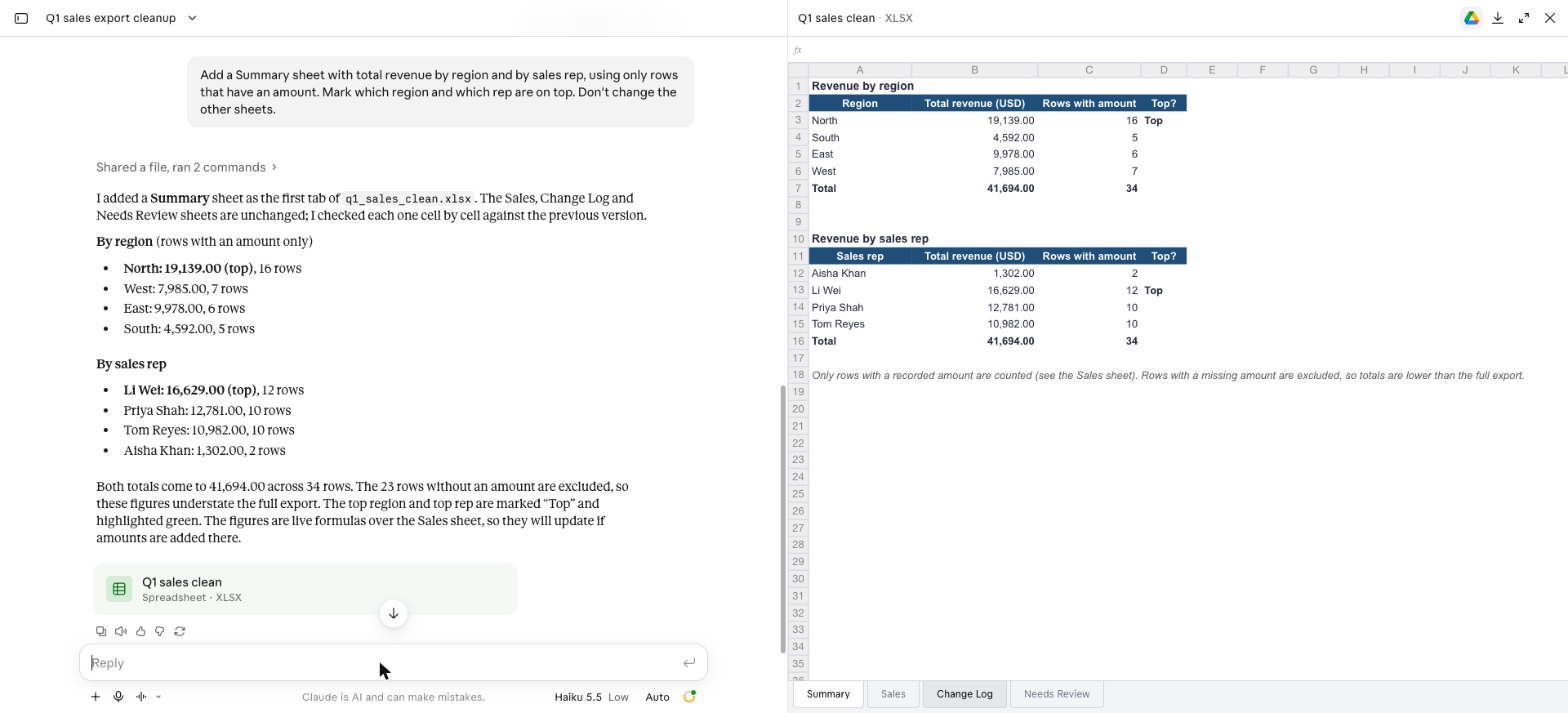
It added a Summary tab as the first sheet, marked North as the top region and Li Wei as the top rep, and said it had compared the other three sheets cell by cell against the previous version to confirm nothing changed. The figures are live formulas over the Sales sheet, so they update if you fill in a missing amount.
I checked these too: North 19,139 across 16 rows, Li Wei 16,629 across 12 rows, and every other line matched my own calculation exactly.
The line "don't change the other sheets" is worth copying into your own requests. It costs nothing and it shows up in what Claude reports back.
Make it work on your own spreadsheet
- Export your messy file as CSV or Excel and attach it to a new chat.
- Say what's wrong in your own words, and name your date format.
- End with: "Tell me exactly what you changed and what you could not fix."
- Check three numbers against the original.
- Open the Needs Review tab and deal with those rows yourself. Those are the ones that need a person.
- For follow-ups, say what to add and what to leave alone.
There's a download button on the spreadsheet panel if you want the file in Excel. I didn't try it, so I can't say how it behaves once it's open there.
What this doesn't cover
- Claude Data needs a connection to a company data warehouse, such as BigQuery or Redshift. I don't have one, so I didn't test it.
- Whiteboards I also left alone, since it's built for working with a team.
- Anthropic describes Sheets as a beta with simple features for now. It handled this cleanup well, but I wouldn't hand it a complex model with deep formulas without checking.
- This was invented data and it was a single run. Your real file will have stranger problems.
- I used the account's default model, Haiku 5.5 on low effort, with no setup. It's part of the plan, so there was no separate charge.
Sources
- https://claude.com/resources/articles/sheets-whiteboards-data
Editorial note: We ran the steps in this guide ourselves and the screenshots come from those runs. Your results may differ with your plan, model or settings, so check anything important. Cover illustrations are AI-generated. Discovia is independent and not affiliated with Anthropic.
New guides and tools
Hands-on Claude guides, straight to your inbox
Step-by-step walkthroughs of what's new in Claude and Anthropic's tools, with real screenshots and honest results, including what didn't work. No hype, no jargon, no noise.
By subscribing, you agree to receive newsletter and marketing emails, and accept our Terms of Use and Privacy Policy. You can unsubscribe anytime.
Everyday Claude
Practical guides to the Claude apps: chat, connectors and artifacts, checked against real numbers.
More Claude Apps guides →